
- Tham gia
- 25/4/15
- Bài viết
- 10,837
- Reaction score
- 661
- Điểm
- 113
- Địa phương
- Hà Nội
- Website
- minhkhoinguyen.com
Mời anh em test thử Microsoft Office 2016 (15.13.1) Beta Patch. Mọi lỗi lầm gì report bên dưới giúp mình. Nếu share bài viết thì nhớ share cho đúng để anh em làm không được, lỗi không biết nhờ ai. Còn script mấy bác có thể dễ dàng sửa mấy dòng Copyright....của em nhưng nhớ là sửa bằng Text Editor và save lại rồi mới share cho anh em dùng nhé. 
Update 20/08/2015:
Download Patcher: Auto Patch Office 2016 v1.3
Pass extract: osxvn
Install:
1. Xoá Self-signed Certificate đã tạo( nếu có).
2. Open Patch v1.3.pkg và tiến hành cài đặt.
Nếu vẫn lỗi, thì xoá sạch keychain liên quan MS Office đã lưu, Xoá certificate đã tạo, Office 2016. Cài lại Office 2016 v15.13.1 và chạy Patch.pkg lần nữa.
Đọc và thực hiện chính xác các quy trình yêu cầu:
1. Gỡ bỏ sạch bản Office đã cài hoặc đã được active bởi phương thức cũ. Phải đảm bảo sạch như theo hướng dẫn tại đây: [Video] Complete Uninstall MS Office 2016 for Mac
2. Cài lại Office 2016 Lastest v15.13.1 từ MS hoặc fast link download tại topic này: Microsoft Office 2016 15.13.1 Update[Newest]. Tiến hành cài đặt, sau khi cài đặt kết thúc chắc chẳn rằng không có ứng dụng nào thuộc gói Office đang được mở.
3. Tạo một Self-signed Code Certificate theo hướng dẫn tại đây: Tạo Self-signed Code Certificate để build ứng dụng trong Xcode
Lưu ý:
+ Name của Self-Signed Code Certitifcate trong trường hợp này các bạn phải đặt là: Codesign
+ Lưu Certificate ở đâu, phải chọn là: System
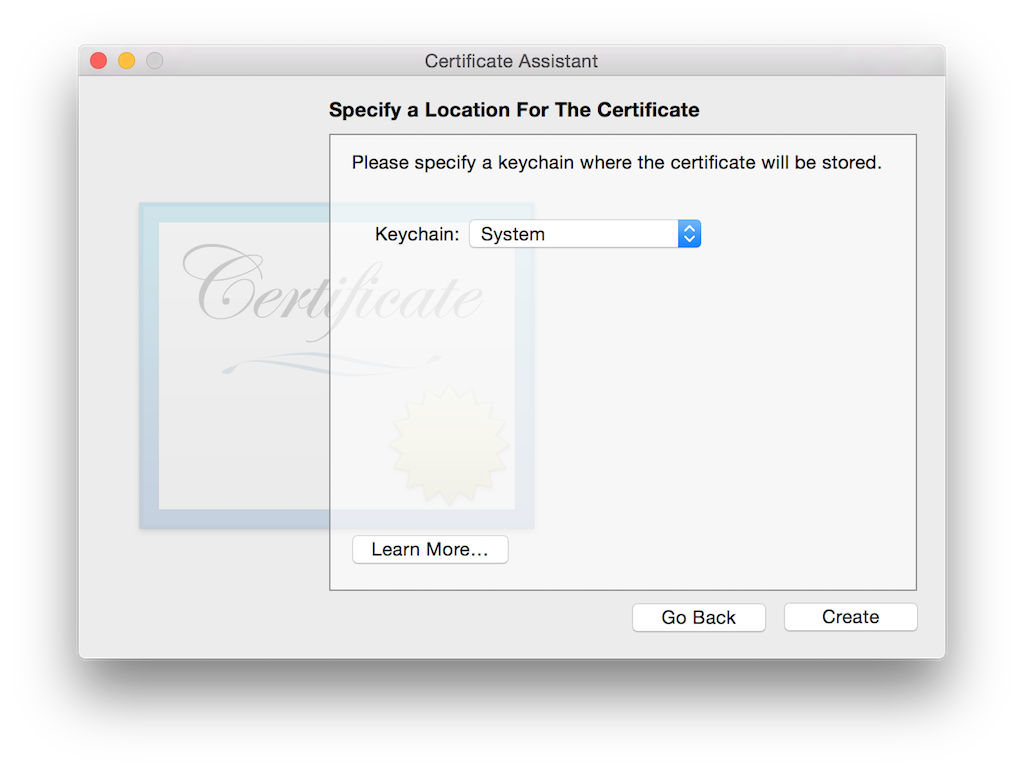
Nếu không là đúng hướng dẫn này sẽ bị lỗi Codesign: no identity found
4. Download Microsoft Office 2016 (15.13.1) Patch tại đây: Fshare
5. Cài đặt Command Line Tool for Xcode download tại:
+ Cho OS X Mavericks 10.9: Fshare
+ Cho OS X Yosemite 10.10+: Fshare
6. Giải nén và R-Click vào Script download ở bước 4 ---> Open with Ternimal
Hoặc mở Ternimal kéo thả file script vào và enter để chạy. Lưu ý tiến hành với quyền sudo.
Lưu ý: cấp quyền thực thi cho file Script trước khi run nhé:

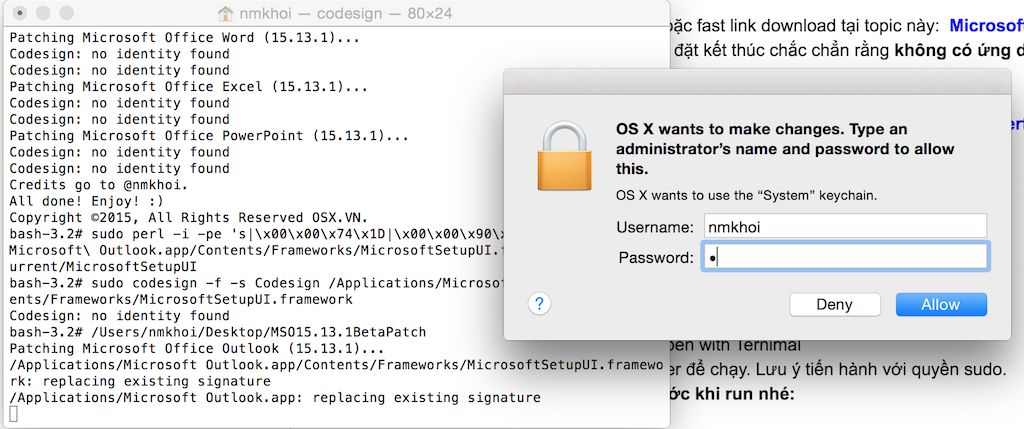
Lưu ý nữa: nếu trong lúc chạy script mà có nhắc thế này thì nhập Username và pass của tài khoản root( login là được).
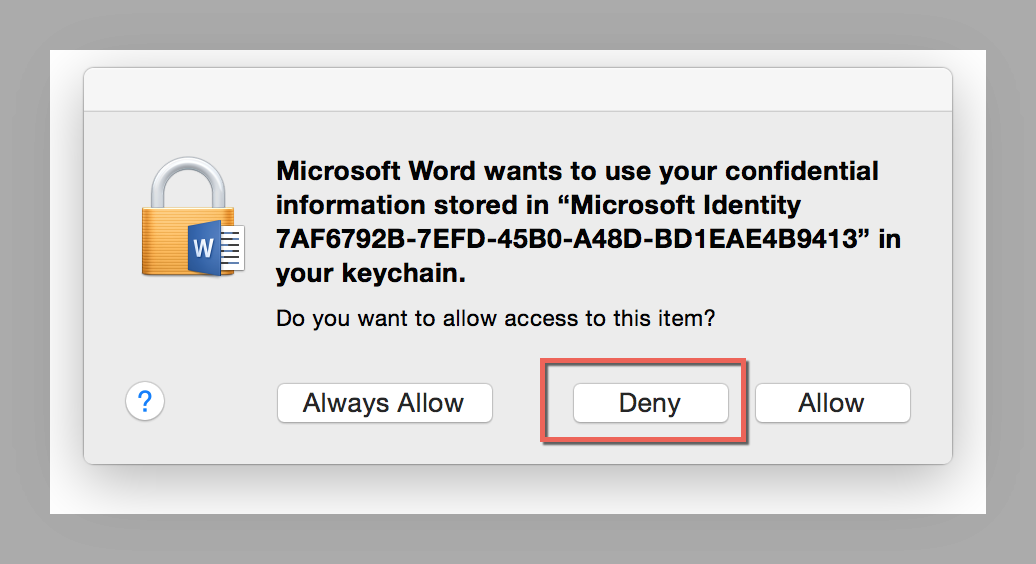
7. Khi mở ứng dụng sau khi active nếu được hỏi như bên dưới thì Deny hoàn toàn nhé.
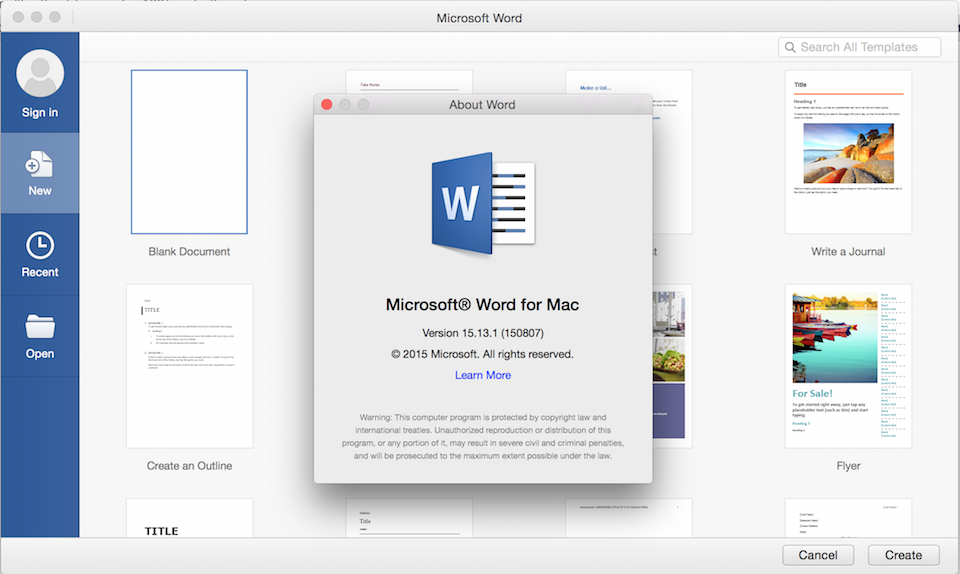
Giải pháp này bạn sẽ sử dụng được Office 2016 v15.13.1 full tính năng ngoài trừ không thể login vào MS account :3 Kết quả đây:
Bug fixed:
Lỗi crash sau khi patch. ---> Patch lại lần nữa.
Nếu vẫn crash thì download file này tại Fshare
Giải nén và replace với file gốc trong đường dẫn /Application/Excel.app/Contents/Framework
Lưu ý: mình ví dụ với Excel còn Word, Powerpoint hay... khác thì đường dẫn các bạn thay thế cho thích hợp nhé.
Update 20/08/2015:
Download Patcher: Auto Patch Office 2016 v1.3
Pass extract: osxvn
Install:
1. Xoá Self-signed Certificate đã tạo( nếu có).
2. Open Patch v1.3.pkg và tiến hành cài đặt.
Nếu vẫn lỗi, thì xoá sạch keychain liên quan MS Office đã lưu, Xoá certificate đã tạo, Office 2016. Cài lại Office 2016 v15.13.1 và chạy Patch.pkg lần nữa.
Đọc và thực hiện chính xác các quy trình yêu cầu:
1. Gỡ bỏ sạch bản Office đã cài hoặc đã được active bởi phương thức cũ. Phải đảm bảo sạch như theo hướng dẫn tại đây: [Video] Complete Uninstall MS Office 2016 for Mac
2. Cài lại Office 2016 Lastest v15.13.1 từ MS hoặc fast link download tại topic này: Microsoft Office 2016 15.13.1 Update[Newest]. Tiến hành cài đặt, sau khi cài đặt kết thúc chắc chẳn rằng không có ứng dụng nào thuộc gói Office đang được mở.
3. Tạo một Self-signed Code Certificate theo hướng dẫn tại đây: Tạo Self-signed Code Certificate để build ứng dụng trong Xcode
Lưu ý:
+ Name của Self-Signed Code Certitifcate trong trường hợp này các bạn phải đặt là: Codesign
+ Lưu Certificate ở đâu, phải chọn là: System
Nếu không là đúng hướng dẫn này sẽ bị lỗi Codesign: no identity found
4. Download Microsoft Office 2016 (15.13.1) Patch tại đây: Fshare
5. Cài đặt Command Line Tool for Xcode download tại:
+ Cho OS X Mavericks 10.9: Fshare
+ Cho OS X Yosemite 10.10+: Fshare
6. Giải nén và R-Click vào Script download ở bước 4 ---> Open with Ternimal
Hoặc mở Ternimal kéo thả file script vào và enter để chạy. Lưu ý tiến hành với quyền sudo.
Lưu ý: cấp quyền thực thi cho file Script trước khi run nhé:
Mã:
sudo -s
password:( nhập pass của root)

chmod +X KÉO_THẢ FILE_PATCHER_VÀO( make script to unix excutable)
sudo chmod 777 KÉO_THẢ FILE_PATCHER_VÀO
ENTER
Lưu ý nữa: nếu trong lúc chạy script mà có nhắc thế này thì nhập Username và pass của tài khoản root( login là được).
7. Khi mở ứng dụng sau khi active nếu được hỏi như bên dưới thì Deny hoàn toàn nhé.
Giải pháp này bạn sẽ sử dụng được Office 2016 v15.13.1 full tính năng ngoài trừ không thể login vào MS account :3 Kết quả đây:
Bug fixed:
Lỗi crash sau khi patch. ---> Patch lại lần nữa.
Nếu vẫn crash thì download file này tại Fshare
Giải nén và replace với file gốc trong đường dẫn /Application/Excel.app/Contents/Framework
Lưu ý: mình ví dụ với Excel còn Word, Powerpoint hay... khác thì đường dẫn các bạn thay thế cho thích hợp nhé.
Last edited:


